One missed allergen. One health incident.
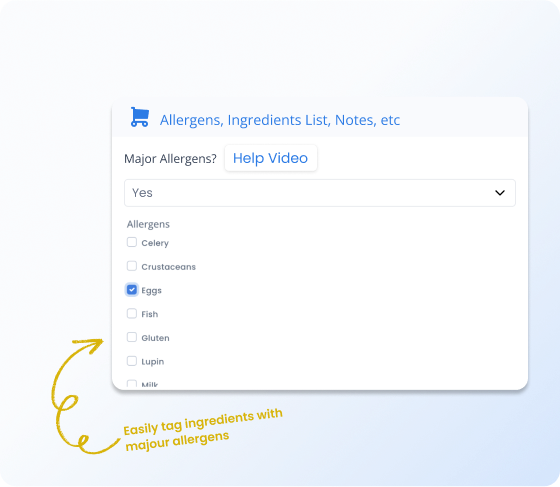
Tag allergens on ingredients and they flow through to every recipe automatically.
Getting allergens wrong isn't a small mistake
One missed allergen tag can mean a health incident, a lawsuit, or a lost customer. Manual tracking across dozens of ingredients and hundreds of recipes doesn't scale.
- Manual allergen tracking is error-prone at scale
- Staff rely on memory instead of documented data
Tag it once on the ingredient. Every recipe that uses it shows the allergen automatically.
Allergen management is a big deal — and it's one of those things where getting it wrong can be really serious. Recipe Cost Calculator lets you tag each ingredient with its allergens (gluten, dairy, nuts, shellfish, etc.), and those tags flow through to every recipe that uses that ingredient.
Open any recipe and you can see at a glance exactly which allergens are present. If a customer asks "does this contain tree nuts?", you have the answer immediately — not after digging through ingredient labels in the back.
What you get
Automatic allergen flow
Tag allergens on ingredients and they cascade to every recipe automatically.
Accurate everywhere
Allergen data shows up on recipe views, prep sheets, and PDF exports.
Change once, update all
Switch brands and every recipe using that ingredient updates its allergen profile instantly.
How it works
Tag your ingredients
Mark each ingredient with its allergens — gluten, dairy, nuts, shellfish, soy, and more.
Allergens flow to recipes
Open any recipe and see the complete allergen profile compiled automatically.
Keep it current
Swap an ingredient or change a brand, and every recipe's allergen data updates immediately.
Automated allergen tracking vs. manual lists
| The old way | With RCC |
|---|---|
| Separate allergen spreadsheet that's always outdated | Allergens live on ingredients and flow to recipes automatically |
| Swapping a brand means rechecking every recipe | Change the ingredient once — every recipe updates instantly |
| Staff rely on memory for allergen questions | Accurate allergen data on every recipe view and prep sheet |
Allergen information shows up on recipe views, prep sheets, and exports. When you change an ingredient (say, swapping one brand of soy sauce for another), the allergen profile for every recipe using it updates automatically.
This is useful for restaurants, catering companies, and food manufacturers — anywhere you need to communicate allergen information accurately and consistently to your team or your customers.
Why this matters
Allergen confidence across your whole menu.
When allergen data lives on each ingredient and flows through to every recipe automatically, you don't have to rely on memory or manual tracking. Your team has accurate allergen information for every dish, every time.
Frequently asked questions
Protect your customers and your business
Tag once, accurate everywhere. Allergen tracking that actually scales.