Eyeballing orders = over-ordering waste + emergency runs
Pick your recipes, set quantities, and get a complete shopping list. If you track inventory, it subtracts what's on hand.
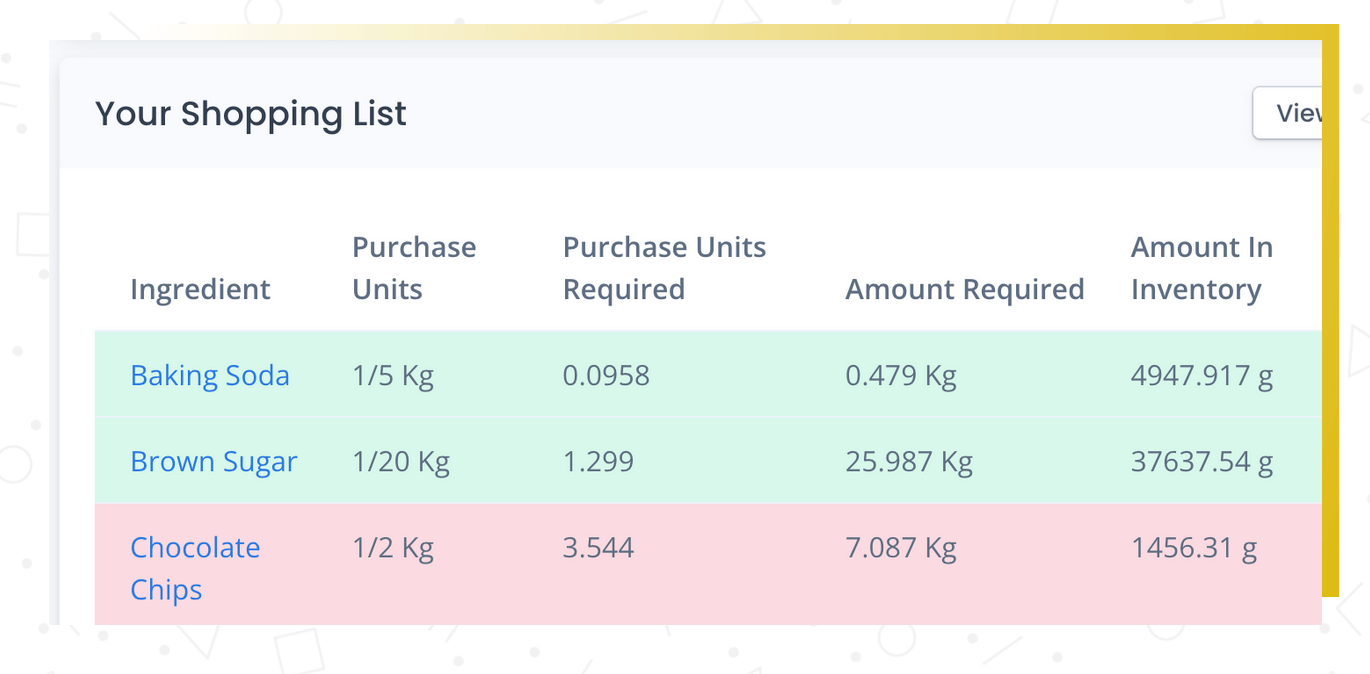
You're wasting money both ways
You overbuy to be safe, and still make emergency runs for the thing you forgot. The waste from over-ordering adds up quietly. The emergency run costs time and premium prices.
- Estimating order quantities instead of calculating them
- No way to account for what's already in stock
- Same ingredient across multiple recipes not consolidated
A shopping list from your actual recipes, adjusted for inventory, means you order exactly what you need.
Pick the recipes you need to make, set the quantities, and Recipe Cost Calculator generates a complete shopping list — every ingredient, the exact amount you need, and the cost. If you're using the inventory features, it accounts for what you already have on hand and only lists what you need to buy.
You can export the list to Excel, print it, or use it as the basis for a purchase order. It's the fastest way to go from "here's what we're making this week" to "here's what we need to order."
What you get
Recipe-based shopping
Select recipes and quantities. The system calculates every ingredient across all of them.
Subtract what's on hand
The list subtracts current stock and shows only what you need to buy.
Consolidated quantities
Three recipes use butter? One line with the total amount, grouped by category or supplier.
How it works
Select your recipes
Pick the recipes you need and set quantities.
Generate the list
Every ingredient consolidated into single line items across all recipes.
Order what you need
Inventory subtracts what's on hand. You see only what to buy.
Calculated shopping lists vs. educated guessing
| The old way | With RCC |
|---|---|
| Estimate what you need based on experience | Exact quantities calculated from your recipes |
| No idea what's in stock — buy extra to be safe | Inventory subtracted — buy only what's needed |
| Three recipes need butter — you forget to add them up | All quantities consolidated into one line per ingredient |
Shopping lists group ingredients by category or supplier, depending on how you prefer to organize your ordering. Quantities are consolidated — if three recipes all use butter, you see one line for the total amount needed, not three separate entries.
Why this matters
Order exactly what you need.
A shopping list that's generated from your actual recipes and adjusted for your current inventory means you order the right amounts. Less over-ordering, fewer emergency runs, less waste. Simple concept, big impact on your weekly routine.
Frequently asked questions
Order exactly what you need — nothing more, nothing less
Recipe-based shopping lists eliminate over-ordering and emergency runs.